
Tradera – buy & sell
TraderaShopping
4.663.00 Reviews
- Version
- 3.192
- Installs
- 1.00M
- Age Rating
- Everyone
Screenshots
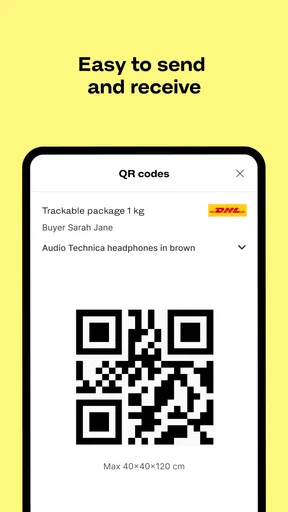
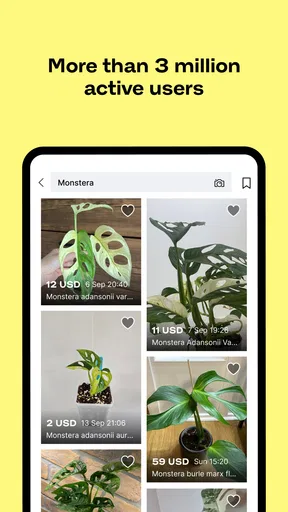
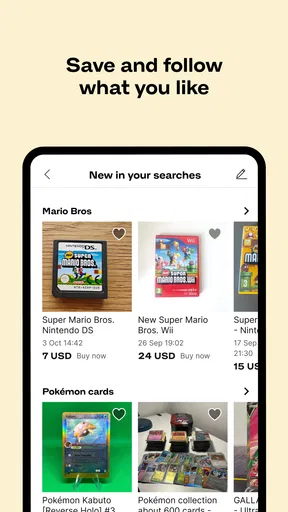

Our Review of Tradera – buy & sell
 Analysis by Appyee
When an app is new, browsing can feel like entertainment in its own right. The harder test comes later: does it still help when you have a particular thing to sell or buy, and is it easy enough to keep using without turning into another chore? I see Tradera – buy & sell as most worthwhile when it becomes a practical habit rather than a place to scroll without a purpose.
The appeal in the first week
At first, the draw is the range of things to browse and the chance that an ordinary search will turn up something unusual. Tradera is a shopping app from developer Tradera, with more than a million installs and a 4.6 average from around 63,000 ratings. Those figures suggest a sizeable audience, but what matters in daily use is whether the marketplace fits what you actually want to do: find a particular second-hand item, explore a category, or clear something out at home.
For a first visit, I would start with one specific search rather than trying to inspect the whole marketplace. Used goods vary in condition, presentation and seller detail, so a focused search makes it easier to compare like with like. If I were looking for a particular jacket, for example, I would check the photos and description carefully, then compare several listings before deciding whether the asking price and condition make sense together.
What is Tradera All About?
So, what's the deal with Tradera – buy & sell? Picture this: a vibrant marketplace right at your fingertips, filled with a smorgasbord of items ranging from fashion and electronics to collectibles and antiques. It's like having a flea market in your pocket, minus the crowds and unpredictable weather!
Tradera is a platform that thrives on the spirit of buying and selling. It's not just about transactions; it's about connections. Whether you're offloading last season’s wardrobe or hunting for a vintage gem, Tradera makes it easy and fun.
Getting Started with Tradera
First things first, getting started is a breeze. Download the app, set up your account, and you're ready to roll. The interface is user-friendly, making navigation a walk in the park. You don't need to be a tech guru to figure this one out, trust me!
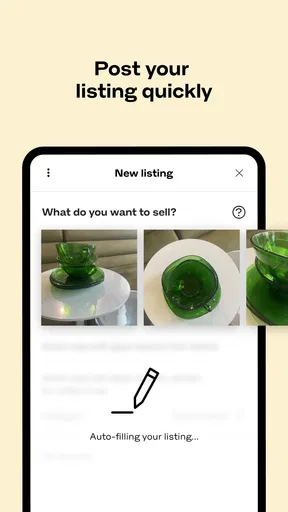
Once you're in, you can browse through various categories or use the search bar if you're on a mission for something specific. And if selling is your game, listing an item is straightforward. Snap a picture, add a description, set your price, and voila! Your item is live for a community of eager buyers.
Keeping the habit useful
The strongest reason to return is having a real task waiting: a household item to pass on, a replacement to find, or a niche object you would rather buy second-hand. For sellers, it helps to treat listing as a small, deliberate job. Photograph the item in good light, show details that affect condition, and write down what a buyer would need to know before asking. That makes the listing more useful and can reduce avoidable back-and-forth.
A realistic routine might be taking a few clear photos of an unused lamp while tidying, drafting the description when you have a quiet moment, and checking messages later rather than letting the sale interrupt the day. I would also decide in advance what price feels acceptable and how much effort I am willing to spend. If an item is bulky, fragile or hard to describe, the time and coordination involved may outweigh the amount recovered.
For buyers, a practical tip is to compare the total value of a listing, not just its headline price. Condition, shipping arrangements and the time involved in bidding or communicating all affect whether a second-hand find is genuinely convenient. A bargain is less appealing if the item is poorly photographed or the description leaves important questions unanswered. Messaging the seller before committing is sensible when a detail could change your decision.
The Buying Experience
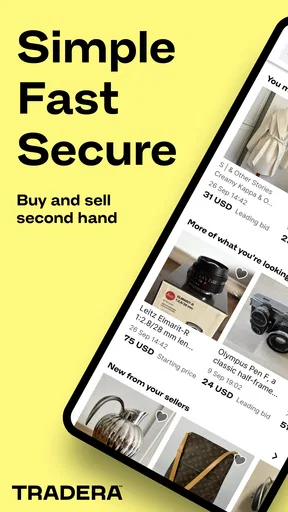
Shopping on Tradera is like treasure hunting. You never know what you might find. The app’s algorithm often throws in recommendations based on your browsing history, which is a neat touch. Plus, the bidding feature adds a dash of excitement, allowing you to snag deals at a price you're comfortable with.
Payment is secure, and the app supports various payment methods. I found the entire process smooth, from selecting an item to receiving it at my doorstep. Shipping options are flexible, and you can often track your package, which is a huge plus for peace of mind.
When browsing becomes work
The same variety that makes browsing enjoyable can also make it tiring. Recommendations may be useful when they surface related finds, but they can pull attention away from a specific purchase. I would use search and categories with a clear aim, then stop once I have enough suitable options to compare. That is more likely to lead to a considered choice than repeatedly refreshing a broad feed.
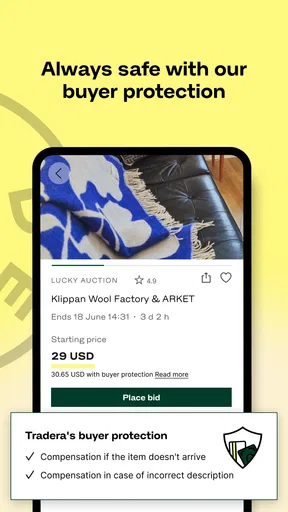
Bidding also suits some people more than others. It can make a listing engaging, but it asks you to pay attention to timing and to stick to a limit. If you dislike uncertainty or want a simple, immediate purchase, a fixed-price listing or a conventional retailer may be a better fit. I would set a personal ceiling before bidding, including any delivery cost I expect, and walk away if the competition pushes the total beyond what the item is worth to me.
Selling with Ease
Now, if you're looking to let go of some items, Tradera is your stage. The selling process is as intuitive as it gets. You have control over your listings, and the app provides insights into your sales and performance.
One of the standout features for sellers is the ability to communicate with potential buyers. This interaction can help clarify any questions and often leads to a successful sale. Remember, a well-taken photo and a detailed description can work wonders in attracting buyers.
How it compares with other ways to shop
Compared with a general online retailer, Tradera is better suited to searching across second-hand goods and unusual finds than to buying a standard product with identical specifications every time. A retailer is usually the simpler choice when you need a predictable model, a new item, or a quick checkout without comparing individual sellers. Tradera’s appeal is the possibility of finding a pre-owned alternative or something harder to locate through ordinary retail.
Local classified listings can be more practical when you want to inspect an item in person or avoid arranging delivery, especially for something awkward to transport. A marketplace app is more convenient when you want to browse from home and communicate through the platform. Neither approach removes the need to judge condition and seller information; the best option depends on whether convenience, inspection or selection matters most for that purchase.
It is also worth remembering that second-hand shopping is not automatically the greener or cheaper choice in every individual case. Reusing an item can extend its life, which is a sensible reason to look here, but a long search or an unsuitable purchase is still wasted effort. I would use the app where pre-owned condition is acceptable and the item meets a genuine need, rather than buying simply because a listing looks like a deal.
Community and Support
What makes Tradera truly special is its community. It's not just about buying and selling; it's about fostering connections. The app has a built-in messaging system that allows for easy communication between users. Plus, the feedback and rating system ensures that everyone plays fair.
If you ever find yourself stuck or in need of help, Tradera’s customer support is responsive and helpful. There’s a comprehensive FAQ section, but if your query is unique, reaching out to their team usually results in a quick resolution.
What it takes to keep using it
For maintenance, I would keep the app tied to concrete buying or selling needs. A seller has to prepare listings, answer questions and follow through on the transaction; that effort is part of the exchange, not something an app can remove. Keeping descriptions accurate and responding clearly helps make the experience smoother for both sides. If I had several things to sell, I would list them in manageable batches instead of turning a free afternoon into an exhausting clear-out project.
As a buyer, the ongoing effort is mostly about being selective. Search with a clear idea of acceptable condition, compare the details in each listing, and avoid letting an interesting browsing session become an impulse purchase. The app is free to download, although it includes in-app purchases priced from 99 cents to $20.99 per item; I would check what an optional purchase relates to before spending. The free entry point makes trying the marketplace straightforward, but it does not mean every transaction will be cost-free or effortless.
Tradera is rated for Everyone and was released on June 20, 2011. Its current version is 3.185, with Android 7.0 as the minimum operating system requirement. The long-running presence and broad audience make it feel like an established place to browse, but an app’s age alone does not guarantee that every listing suits every buyer. I would still judge each item on its own information and the communication around it.
Final Thoughts
Overall, Tradera – buy & sell is more than just a marketplace; it’s a community that brings buyers and sellers together in a seamless and enjoyable way. Whether you’re decluttering or deal-hunting, Tradera offers a platform that’s easy to navigate and fun to use.
So, next time you’re staring at that pile of unused gadgets or itching for a shopping spree, give Tradera a whirl. Who knows? You might just find what you didn’t even know you were looking for!
My longer-term verdict is that it earns a place on your phone if you expect to use second-hand shopping more than once in a while, or if you have items worth listing and the patience to handle the details. It is less compelling for someone who wants every purchase to be new, uniform and immediate, or who finds messaging and comparing listings draining. I would keep it as a practical marketplace rather than a daily destination: open it with a purpose, make careful choices, and let the usefulness of each transaction—not the novelty of endless browsing—decide whether it stays in your routine.
Verdict
Strengths of Tradera – buy & sell
- User-friendly interface for easy navigation.
- Secure payment methods keep transactions safe.
- Wide variety of items available for purchase.
- Efficient search filters enhance shopping experience.
- Active community with helpful user reviews.
Limitations of Tradera – buy & sell
- Limited customer support response times.
- Occasional app crashes on older devices.
- Some listings lack detailed photos.
- Shipping costs can be unpredictable.
- In-app ads can be slightly intrusive.
Similar Picks in This Category
View All
SHEIN-Shopping Online
Roadget Business PTE. LTD.4.8

Amazon Shopping
Amazon Mobile LLC4.4


Mercado Libre: Compras online
Mercado Libre4.8

Wish: Shop and Save
Wish US Holdings LLC4.7

Alibaba.com - B2B marketplace
Alibaba Mobile4.4
Frequently Asked Questions
What is Tradera and how does it work?
Tradera is an online marketplace app that allows users to buy and sell a wide range of items. It facilitates secure transactions between buyers and sellers, providing an easy-to-use platform to list items for sale or browse through various categories to make a purchase. The app offers features like bidding, fixed price options, and secure payment methods to ensure a smooth trading experience.
Is Tradera safe to use for transactions?
Yes, Tradera prioritizes user safety by implementing secure payment methods and protecting user information. The app uses encrypted connections and offers buyer and seller protection policies to minimize risks during transactions. Users are encouraged to review seller ratings and feedback before making a purchase to ensure a trustworthy shopping experience.
What are the fees associated with using Tradera?
Tradera charges sellers a listing fee and a final value fee once an item is sold. The listing fee depends on the item's category and additional features selected to enhance the listing. The final value fee is a percentage of the total sale price. Buyers typically do not incur any fees unless specified by the seller for shipping or other services.
Can I use Tradera on both Android and iOS devices?
Absolutely, Tradera is available for both Android and iOS platforms. The app can be downloaded from the Google Play Store or Apple App Store, respectively. It offers a seamless user interface on both platforms, ensuring that users can easily navigate, list items, and make purchases regardless of their device.
What should I do if I encounter a problem with a transaction on Tradera?
If you face any issues with a transaction on Tradera, it is recommended to contact the app’s customer support. They can assist in resolving disputes between buyers and sellers. Additionally, Tradera offers a resolution center where users can report problems and seek assistance. It is important to keep all transaction records for reference during any dispute resolution.
